TekDetek user guide
TekDetek is an in-browser VJ and video tool by VJ Vik Mil (Viktors Mileika). Webcam or MP4 in, node graph out: ASCII, reaction-diffusion, cellular automata, detection, overlay, record — no Resolume or TouchDesigner install.
TekDetek is not completely free. Open vikmil.com/tekdetek/, swipe looks, edit. Free export is watermarked and 20 seconds. Free OBS is watermarked and 5 minutes (restart anytime). Pro is clean unlimited export plus desktop add of RD / CA / Depth / Alt ASCII / PreText / GEO 3D / Sonify. Nodes: reference. Looks: GIF showcase. Privacy: policy.
Free
Open the app. Try and edit phone looks (RD and CA included). Luma detection. Hand. Watermarked 20s record. Watermarked 5 min OBS.
Pro
No watermark. No time cap. Full library, Shuffle, higher detection caps, desktop add of the Pro nodes.
What you need
Use an up-to-date Chrome, Edge, or Firefox on desktop for the least friction. Safari can work but WebGL and media decode differ by version. JavaScript must be enabled. The first time you activate video, TekDetek downloads bundled libraries (processing and optional ML helpers) so later visits start faster.
A dedicated GPU helps: real-time ASCII and overlay effects use WebGL. If the preview stutters, reduce ASCII column count, disable OBJECTS/PoseNet detection, or close other tabs. For long MP4 exports, plug in laptop power — thermal throttling lowers frame rate mid-recording.
Step-by-step: your first ASCII clip (5 minutes)
- Open /tekdetek/. Dismiss or read the welcome overlay — it summarises version 0.6 beta features.
- Click the INPUT node in the pipeline. Press Activate camera or Upload video file (H.264 MP4 is safest).
- Confirm the preview appears in the viewport. If black, check browser camera permission or try another file.
- Click LOAD PRESET (top right) and pick e.g. “Prism ramp, punchy contrast” — see the showcase for descriptions.
- Select the ASCII FX node. Adjust columns (grid resolution) and palette until the read is clear on your footage.
- Optional: add OVERLAY and pick a light effect (feedback or CRT at low intensity).
- Select EXPORT, start MP4 capture, stop, download. Free: watermark + 20 seconds. Pro: clean, unlimited.

Step-by-step: detection boxes + ASCII inside regions
- Start from INPUT with live camera or file as above.
- Ensure an AI DETECT node sits before ASCII. Select it; choose LUMA for lightweight gigs or OBJECTS for labelled boxes (heavier).
- Tune luma threshold and grid until boxes track your subject under venue lights.
- Select ASCII FX; enable Only in boxes so glyphs render inside detections only.
- Add OVERLAY — enable fan or closest lines between boxes for a tracking aesthetic.
- Load preset “Luma grid + fan lines” from the showcase if you want a proven starting graph.
How the node graph works
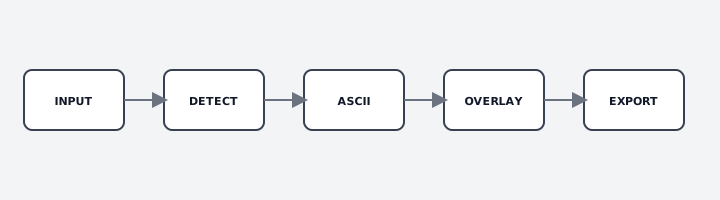
Nodes are boxes; connections carry video forward. Tap or click a node to open its inspector (side panel on desktop, bottom sheet on mobile). Use + ADD NODE or presets to change topology. SHUFFLE randomises parameters — useful for discovery, less so mid-show.
Delete nodes you do not need. Long chains cost GPU time. For live performance, prefer INPUT → DETECT (optional) → ASCII → EXPORT, adding OVERLAY only when the look requires it. Full parameter tables live in the node reference.
Effect families (overview)
ASCII — glyph grid and blocks. Alt ASCII — separate WebGL charset (Pro to add on desktop). RD — reaction-diffusion field. CA — cellular automata grid. Depth — stylized mesh / melt. Hand — free pinch/span camera. PreText — type in a silhouette (Pro). GEO 3D — procedural mesh (Pro). Sonify — detection to sound (Pro). Overlay — lines plus glitch / CRT / feedback. Halftone-style dither is a treatment on ASCII or Overlay, not its own node.
AI-assisted nodes
LUMA runs locally with no model download. OBJECTS (COCO-SSD) and FEATURES (PoseNet) download weights on first use and increase CPU/GPU load. If a model fails, reload once on a stable connection or fall back to luma. Always rehearse detection under show lighting — dark stages break object confidence.
Presets and saving work
SAVE PRESET / LOAD PRESET use browser storage (localStorage / IndexedDB). Clearing site data wipes them. Built-in presets ship with the app; custom saves stay on your device until you export or share screenshots. Tag @tekdetek with clips you want featured.
Recording and performance
EXPORT encodes the pipeline at capture time. Free: watermarked MP4 or PNG, 20 seconds. Pro: no watermark, no time cap. PNG ZIP is for stills in an NLE. Lower preview resolution before long captures if the fan spins up. Disable expensive overlay effects while tuning ASCII, re-enable for export.
Troubleshooting
- Black or frozen preview: verify INPUT has valid media, check node wiring, reload, try another browser.
- Camera blocked: browser site settings → allow camera; close other apps using the device.
- WebGL errors: update drivers; simplify graph; try Chrome or Edge.
- ML model stuck loading: network/firewall blocking weights; switch to LUMA detection.
- Export dropped frames: reduce ASCII columns and overlay effects; close background apps.
ASCII video & browser VJ workflows
TekDetek is aimed at creators searching for an ASCII video filter online, a browser VJ tool, or a webcam ASCII effect without a desktop install. Upload MP4 or perform live, wire nodes, export video for Instagram, TikTok, or projection tests. Updates: @tekdetek. Free export is watermarked and 20 seconds; Pro is clean and unlimited.
FAQ
What is TekDetek? An in-browser node graph for live ASCII, reaction-diffusion, cellular automata, overlay, detection, and recording.
What is free? Open, swipe, edit (phone RD/CA included), luma, Hand, watermarked 20s record, watermarked 5 min OBS.
What is Pro? Clean unlimited export and OBS, full library, Shuffle, desktop add of RD / CA / Depth / Alt ASCII / PreText / GEO 3D / Sonify.
Best browser? Chrome, Edge, or Firefox on desktop with WebGL.
Live performance? Yes — keep graphs short, test camera and lighting at the venue first.
How do I record? EXPORT node. Free: watermarked 20s. Pro: clean, unlimited. PNG ZIP for stills.
Uploaded files? Yes — INPUT → Upload video; prefer H.264 MP4 if decode fails.
Luma vs AI objects? Luma is light and local; OBJECTS/FEATURES download models and cost more CPU.
Contact & attribution
TekDetek is built by Viktors Mileika (VJ Vik Mil), London-based VJ and video engineer. Follow @tekdetek for releases. Commercial enquiries: [email protected].
← Open TekDetek · Node reference · Showcase · MIT license · Third-party notices